
How to read manga without ads on iPhone
If you read manga on your phone, you know the routine: a tap that opens a casino tab, a “close” button that is another ad, a video that starts at full volume between pages. Here are the options on iPhone, and what each one actually fixes.
Why manga sites are worse than the rest of the web
Sites that collect chapters from many sources pay their bills with ad networks that don’t ask many questions. Their formats are designed to catch taps: overlays, pop-unders and scripts that redirect the page when you touch it. On a phone, where every touch lands on something, that is most of the reading experience.
Option 1: a content blocker in Safari
iOS lets you install content blockers for Safari. They remove a lot of banners. They are weaker against the tricks manga sites use most — scripts that open new windows on tap and the overlays a site draws itself — and Safari still shows you the whole site around the pages.
Option 2: read on the official app
If a series is on an official app or site, that is the best way to read it: no hostile ads, and the creators get paid. Many series, especially raws and older titles, aren’t available there.
Option 3: a browser built for reading comics
Mieru is a free browser for iPhone that combines two things:
- A blocker across the whole browser. Banners, video ads, pop-ups, redirect scripts and “install our app” overlays are blocked before they load. The block lists are updated in the background, without an app update.
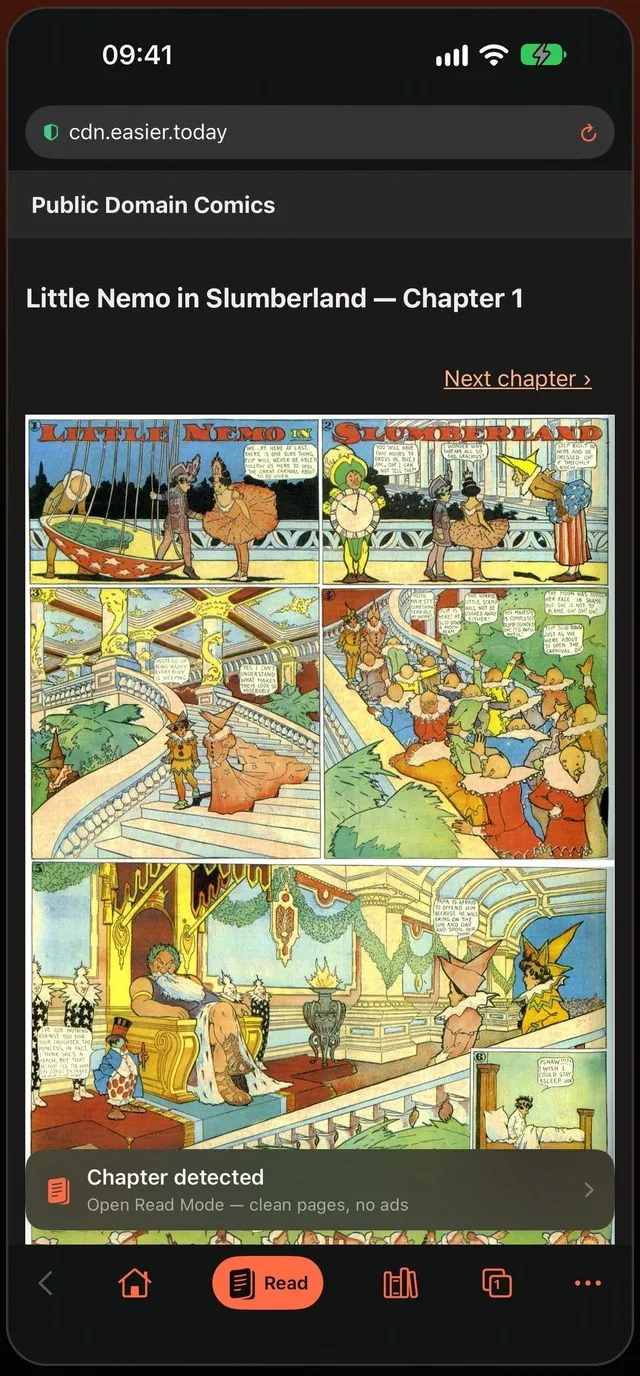
- Read Mode. On a chapter page, tap Read and the chapter’s images move into Mieru’s own reader. The website isn’t there any more, so nothing can pop up.
Setting it up
- Install Mieru and open the site you read. The blocker is already on.
- Go to a chapter. When Chapter detected appears, tap Read.
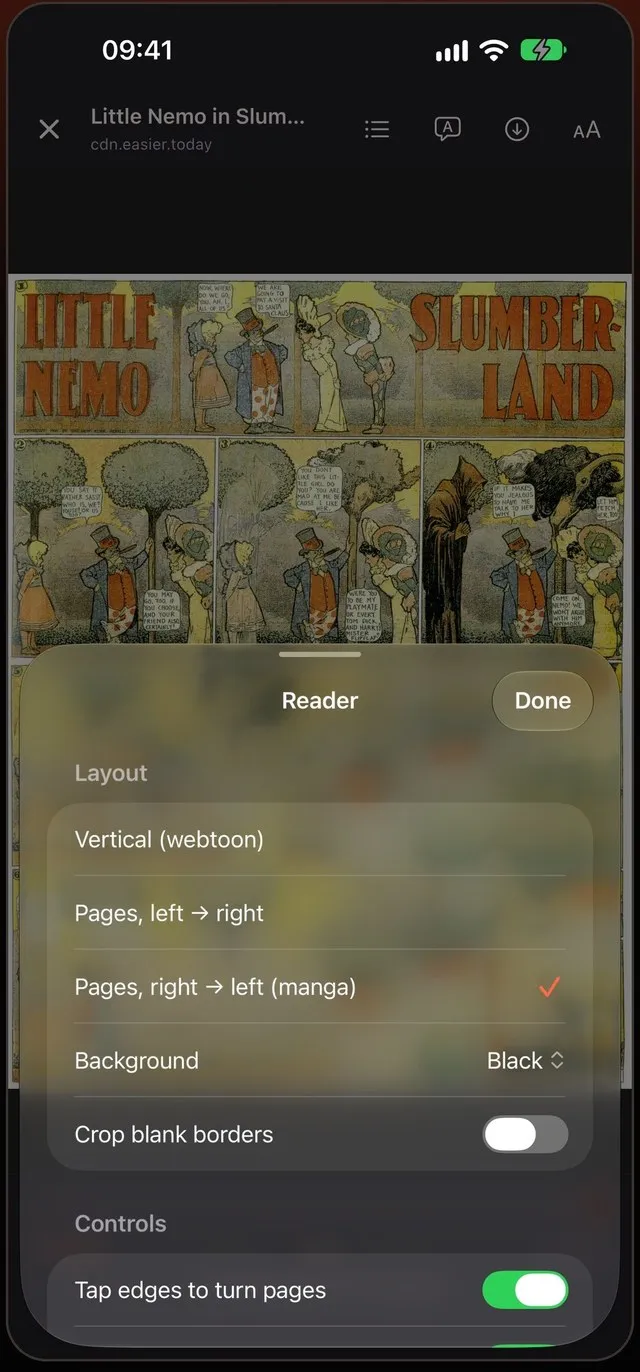
- Pick vertical scroll or pages. Mieru chooses for you — vertical for webtoon-style manhwa, right to left for Japanese manga — and you can change it for the site.
The address bar shows how many pop-ups were stopped on the page. If a site ever needs something the blocker removes and stops working, turn blocking off for that one site from the address bar.
What about DNS blockers and VPN-style blockers?
System-wide blockers that work at the DNS level stop requests to known ad domains in every app. They help, but manga sites often serve their pop-up scripts from the same domain as the pages, or from domains that change weekly, and a DNS blocker can’t remove an overlay the page draws itself. They also can’t stop a script that turns your tap into a redirect. A blocker inside the browser sees the page and can remove those elements; Read Mode goes further and takes the pages out of the site altogether.
The tricks, and what handles them
| Trick | What handles it |
|---|---|
| Banner and video ads | Blocked before they load |
| New tab or window on tap (pop-under) | Pop-up blocking in the browser |
| Tap redirects the page to another site | Redirect scripts blocked; Read Mode removes the site |
| “Install our app” overlay drawn by the site | Filter list for app banners |
| Fake close buttons | Gone with the ad they belong to |
| Ads between pages of a chapter | Read Mode shows the images only |
Bonus: less data, smoother pages
Every blocked ad is a request your phone never makes. Pages load sooner and scroll smoother, and video ads stop eating your data plan.
A note on supporting creators
Blocking ads on an aggregator doesn’t take anything from the people who made the comic — those sites don’t pay them. When a series you love has an official release, reading it there is what keeps it going.
Ad blocker — No pop-ups, no redirects, no ads between pages.
 Coming soon to the App Store